The smartphone in your pocket accompanies you everywhere. It sits on restaurant tables, gets passed to friends and family, travels with you to the gym, and even finds its way into the bathroom. Given this journey, it should come as no surprise that your phone can harbor an alarming amount of bacteria. In fact, studies have found that cell phones carry 10 times more bacteria than most toilet seats. So, how often should you clean your phone?
This comprehensive guide provides a detailed answer. We’ll explore the science behind why phones get dirty, give you a practical cleaning schedule, explain exactly how to clean without damaging your device, and share expert tips to keep both you and your phone healthy. By the end, you’ll have a clear, actionable plan for smartphone maintenance.
How Often Should You Clean Your Phone? The Recommended Schedule
Experts recommend a tiered approach to smartphone cleaning. How often you clean should depend on your environment and daily habits. The general recommendation to answer how often should you clean your phone is as follows: a quick daily wipe and a more thorough weekly disinfection.
Here is a detailed schedule to follow:
Daily: Quick Wipes and Smudge Removal
Who should do this: Everyone, especially heavy users.
Why: Your hands produce natural oils, and every time you touch your screen, you leave behind a fingerprint and a microscopic layer of residue. Over a day, this builds up, making the screen look greasy and less responsive.
Action: At the end of the day, or even multiple times a day, use a dry microfiber cloth to wipe the screen, back, and sides of your phone. This removes dust, oils, and smudges in just thirty seconds. Some experts recommend cleaning it every time you return home to prevent outdoor germs from spreading indoors.
Weekly: Full Disinfection and Deep Clean
Who should do this: Everyone, especially those who take their phone to public places, work, or school.
Why: Studies of mobile phones recorded over 2,200 microbial traces on just a handful of devices, including bacteria, viruses, and fungi. Weekly cleaning prevents these invisible invaders from building up to dangerous levels.
Action: This involves disinfecting your phone. Power it off and remove it from its case. Use a disinfectant wipe or a microfiber cloth lightly dampened with a safe solution to wipe all surfaces. The Federal Communications Commission (FCC) recommends cleaning your phone every day, but a weekly full disinfection balances hygiene with device longevity.
Monthly: Deep Cleaning Ports and Crevices
Who should do this: Anyone who uses their phone in dusty environments or experiences charging issues.
Why: Dust, lint, and debris can accumulate in the charging port, speaker grills, and microphone holes. This buildup can lead to charging problems, muffled audio, and can even trap moisture.
Action: Perform a deep clean. This is the time to carefully remove debris from ports using a wooden toothpick (never metal). Wipe down the interior of the phone case with soap and water, making sure it is completely dry before putting it back on your device.
Adjust for Your Lifestyle
While the above gives a good baseline, the honest answer to the question “how often should you clean your phone” is that it depends on how you use it.
| Lifestyle Factor | Recommended Frequency |
|---|---|
| Frequent Public Transport User | Daily disinfection (you touch many public surfaces). |
| Athletes/Gym Goers | Clean immediately after the workout to remove sweat and bacteria. |
| Healthcare Worker | Clean multiple times a day or after each shift. |
| Shares Phone Often | Disinfect after each time another person handles your device. |
| Eats Over Phone | Clean immediately to remove food debris and sticky residues. |
Why Your Phone Gets So Dirty
Understanding why your phone needs regular cleaning is about more than aesthetics. A 2025 study published in the National Library of Medicine identified 65 distinct antibiotic resistance genes on mobile phones. This is a serious health concern as your phone is constantly touching your hands, mouth, and ears.
Bacterial Transmission
Phones are “germ mobile devices.” As Dr. Charles Gerba, a renowned microbiologist, points out, “You are putting germs on the phones and taking them off all day.” When you set your phone down on a public table or hand it to a friend, you are exchanging microbes. Your phone essentially becomes a mobile petri dish, collecting bacteria from every surface it touches and every hand that holds it.
Impact on Device Performance and Longevity
Cleaning isn’t just about health. A layer of grime can make your screen less responsive. Over time, oils and sweat can degrade the oleophobic (oil-resistant) coating on your screen, making it more susceptible to fingerprints and scratches. This maintenance is about preserving the functionality and value of your investment. A phone with a sticky, smudged screen is not only unpleasant to use but can also interfere with touch sensitivity and facial recognition features.
Skin Irritation and Breakouts
If you are experiencing unexplained breakouts on your cheek or jawline, your phone screen might be to blame. Oil, sweat, and makeup residue from your hands and face build up on the screen. Pressing this dirty surface against your skin can clog pores and cause irritation. This is particularly problematic for individuals with acne-prone or sensitive skin.
The Accumulation of Grime
Think about everything your phone touches during a typical day. It sits on your office desk, goes into your pocket or purse, rests on restaurant tables, and gets handled after you’ve touched doorknobs, handrails, and elevator buttons. All of this contact leaves behind microscopic particles of dirt, food, and bodily fluids. Over time, this invisible layer builds up, creating a breeding ground for unwanted microorganisms.
How to Clean Your Phone: A Step-by-Step Guide
Cleaning your phone is simple if you follow the right steps. However, using the wrong methods can cause expensive damage. Let’s break down the process into clear, actionable steps.
Step 1: Power Off and Unplug
Before you begin cleaning, always turn off your phone and remove it from its case. Unplug any chargers or headphones. This prevents any liquid from getting into the ports while the device is active and reduces the risk of short circuits. Powering off also makes it easier to see smudges and dirt on a dark screen.
Step 2: Daily Surface Wipe
Take a clean, soft microfiber cloth. Gently wipe the screen, back, and sides of the phone in a circular motion to remove smudges and oils. Microfiber is safe for glass and is gentle enough to use on the screen without scratching it. Keep a microfiber cloth in your bag, car, or desk drawer for quick daily touch-ups.
Step 3: Weekly Disinfection
If you are using a disinfectant wipe, ensure it is free from bleach, abrasives, and harsh chemicals. Apple and Samsung now approve the use of 70% isopropyl alcohol wipes. Clorox wipes and similar disinfectants are also safe on modern phone screens, provided you do not use them excessively.
How to disinfect properly:
-
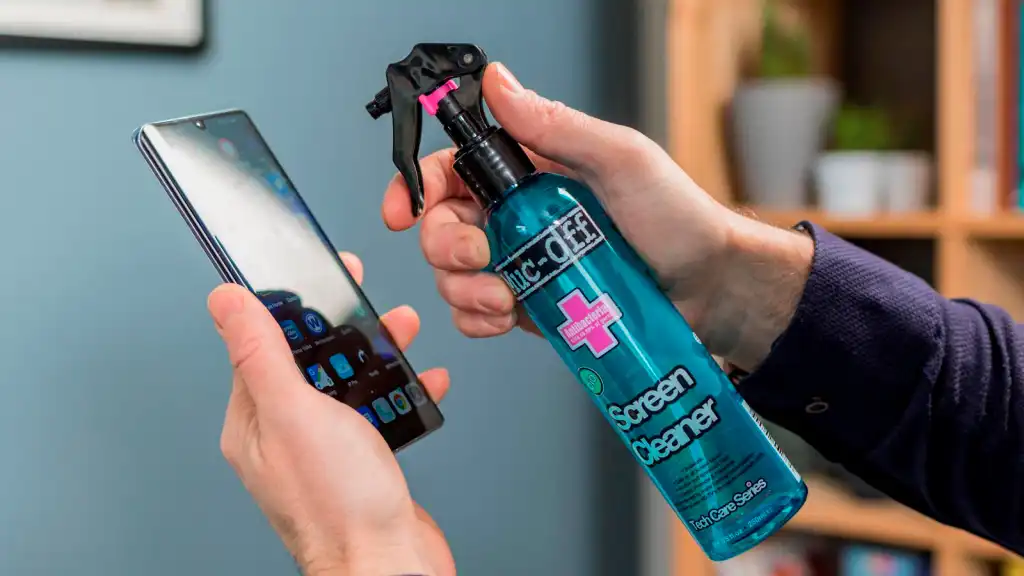
Dampen a microfiber cloth with a solution of 70% isopropyl alcohol and 30% distilled water.
-
Do not apply the liquid directly to the phone; always apply it to the cloth first.
-
Gently wipe the screen and all surfaces, avoiding the ports.
-
Allow the phone to air dry for a few minutes before turning it back on.
This method effectively kills 99.9% of germs while being safe for your device’s protective coatings.
Step 4: Monthly Deep Cleaning of Ports
This is a crucial step often overlooked. To safely clean the charging port:
-
Use a wooden toothpick or a plastic floss pick (never metal or a staple).
-
Gently run the tip along the edges of the port to lift out lint and dust.
-
Do not insert the pick too deep; you could damage the pin connectors.
-
Use a piece of Scotch tape to press into the crevices, catching small debris.
-
Wipe down the speaker grills with a slightly damp Q-tip (being careful not to leave cotton strands behind).
This deep cleaning can resolve many common charging issues where the cable doesn’t click into place properly.
Step 5: Clean the Phone Case
Cleaning your phone is pointless if you put it back in a dirty case. For plastic, rubber, or silicone cases:
-
Soak the case in warm water with a drop of dish soap.
-
Scrub gently with a soft toothbrush to dislodge dirt.
-
Let it air dry completely before putting it back on the phone.
For leather cases, wipe them with a cloth dampened with water. Do not soak them, as this can cause stains and warping.
What NOT to Use When Cleaning Your Phone
Avoiding certain materials is just as important as knowing how to clean. The wrong cleaning agent can ruin your screen’s coating or cause permanent hardware damage.
Harsh Chemicals to Avoid
-
Bleach and Hydrogen Peroxide: These are too strong and will damage the protective coating on your glass. Apple and Samsung advise against using them.
-
Window and Glass Cleaners (Ammonia-based): These strip the oleophobic coating, making your screen more prone to fingerprints and smudges.
-
Vinegar: This acid can erode the screen’s protective layer and cause corrosion over time.
-
Hand Sanitizer: The fragrances and ethyl alcohol in some sanitizers can harm the phone’s surface and leave a sticky residue.
-
High-Concentration Alcohol (>70%): Using pure rubbing alcohol can damage the screen. Always use a 70% mix with distilled water.
Abrasive Materials to Avoid
-
Paper Towels and Toilet Paper: These materials can shred and leave a mess, but more importantly, they are rough and can scratch the glass.
-
Tissue: Cheap tissues can dissolve, leaving a pasty residue on the screen.
-
Regular Cloth: Standard fabrics often contain particles that can scratch the surface.
Actions to Avoid
-
Do Not Spray Liquids Directly: Never spray water, alcohol, or cleaner directly onto your phone. Liquid can seep into the microphone or speaker holes and damage the internals, even in “waterproof” phones.
-
Avoid Compressed Air: The high pressure can push dust and lint further into ports and speakers, or cause condensation that damages components.
-
Avoid Metal Objects: Do not use staples, pins, or paperclips to clean ports, as they scratch the inside and can cause shorts.
The Science Behind Phone Sanitization
Understanding the science of germs on your phone can help you appreciate why regular cleaning is so important. A 2019 study examined 27 mobile phones belonging to teenagers and found microbial growth on 100% of the devices. The bacteria present included Staphylococcus aureus and Escherichia coli, both of which can cause serious illnesses.
How Germs Transfer to Your Phone
Your phone doesn’t generate germs on its own. Instead, it acts as a reservoir that collects bacteria from your hands, face, and the environment. Every time you touch a contaminated surface and then handle your phone, you transfer those microorganisms. Similarly, holding your phone to your face during calls transfers skin bacteria to the screen.
The Role of Temperature
Phones generate heat during use, particularly when charging or running demanding applications. This warmth creates an ideal environment for bacteria to thrive and multiply. A warm phone in a pocket or purse provides the perfect breeding ground for microbial growth.
UV Sanitizers: Do They Work?
UV-C light sanitizers have become popular as a chemical-free way to clean phones. These devices use ultraviolet light to kill bacteria and viruses by damaging their DNA.
Benefits:
-
Kills up to 99.99% of germs
-
No chemicals or liquids involved
-
Safe for all phone surfaces
Limitations:
-
Only sanitizes surfaces exposed to the light
-
Doesn’t reach ports or crevices
-
Typically requires 5-10 minutes per session
-
Can be expensive compared to wipes
While UV sanitizers are effective for routine disinfection, they should be used in combination with regular wiping and port cleaning for complete phone hygiene.
Cleaning Your Phone When You’re Sick
When you’re ill, the question “how often should you clean your phone” takes on added urgency. Germs from coughing, sneezing, and touching your face can easily transfer to your phone screen, creating a reservoir of pathogens that can reinfect you or spread to others.
Daily Disinfection During Illness
When you have a cold, flu, or any contagious condition, you should disinfect your phone multiple times a day. Key moments include:
-
After coughing or sneezing
-
After blowing your nose
-
After touching your face
-
Before eating
-
After returning home from medical appointments
Preventing Reinfection
Your phone can be a vector for reinfection. If you touch a contaminated phone screen and then rub your eyes or touch your mouth, you can introduce the virus back into your system. Regular cleaning breaks this cycle and helps you recover faster.
Isolation Considerations
If you’re isolating due to a contagious illness, consider designating a specific cleaning cloth or wipes for your sick period. Dispose of these properly after you recover to prevent spreading germs to other household members.
Professional vs. DIY Phone Cleaning
When considering how often should you clean your phone, you might wonder whether professional cleaning services are worth the investment.
DIY Cleaning Benefits
-
Cost-effective: Microfiber cloths and isopropyl alcohol are inexpensive
-
Convenient: You can clean whenever needed, without appointments
-
Immediate: Address spills and smudges right away
-
Frequent: You can maintain daily hygiene routines
Professional Cleaning Benefits
-
Thorough: Reaches deep into ports and crevices
-
Equipment: Uses specialized tools and solutions
-
Expertise: Trained technicians who know phone anatomy
-
Warranty safe: Often follows manufacturer guidelines precisely
When to Consider Professional Cleaning
-
If your phone has sticky residue that won’t come off
-
When ports are severely clogged and charging is unreliable
-
If you’ve used the wrong cleaning agents and damaged the screen
-
Before selling or trading in your device
The Environmental Impact of Phone Cleaning
As we think about how often should you clean your phone, it’s worth considering the environmental implications of different cleaning methods.
Disposable Wipes
Pros: Convenient, single-use, effective
Cons: Contribute to plastic waste, often contain chemicals that don’t biodegrade
Reusable Cloths
Pros: Environmentally friendly, cost-effective over time
Cons: Need regular washing to remain effective
UV Sanitizers
Pros: No waste, chemical-free, long-lasting
Cons: Energy consumption, plastic manufacturing impact
Sustainable Cleaning Recommendations
-
Use reusable microfiber cloths for daily cleaning
-
Wash your cleaning cloths rather than replacing them
-
Choose wipes made from biodegradable materials when possible
-
Reduce frequency of disinfectant use when not necessary
Phone Cleaning for Different Operating Systems
While the basic principles apply to all smartphones, there are subtle differences in cleaning recommendations for different brands.
iPhone Cleaning Guidelines
Apple provides specific guidance on their support website:
-
Use 70% isopropyl alcohol wipes
-
Avoid getting moisture in openings
-
Don’t use aerosol sprays, bleaches, or abrasives
-
Clean the screen with a lint-free cloth
Samsung Galaxy Cleaning Guidelines
Samsung offers similar recommendations:
-
Approved cleaning solutions include 70% ethanol or isopropyl alcohol
-
Wipe gently with a soft, lint-free cloth
-
Avoid pressure that could damage the screen
-
Don’t immerse the device in cleaning solutions
Google Pixel Cleaning Guidelines
Google’s guidance aligns with industry standards:
-
Use only a soft, lint-free cloth
-
Dampen the cloth (not the device) with water or isopropyl alcohol
-
Avoid paper towels and abrasive materials
-
Turn the device off and disconnect cables
The Relationship Between Phone Cases and Hygiene
Your phone case plays a significant role in how often you should clean your phone and how effectively you can maintain hygiene.
Case Materials and Bacterial Growth
Different case materials harbor bacteria differently:
-
Silicone and TPU: Porous surfaces trap bacteria; require frequent cleaning
-
Hard plastic: Non-porous but attract fingerprints; easier to wipe clean
-
Leather: Natural material can absorb moisture and oils; needs special care
-
Wood: Porous and difficult to disinfect thoroughly
How Cases Contribute to Dirt Buildup
Cases create crevices where dirt, dust, and moisture accumulate. Over time, these areas become breeding grounds for bacteria. Regular cleaning of both the phone and case is essential.
Cleaning Case-Specific Issues
-
Wallet cases: Clean card slots with a dry cloth; use sanitizing wipes on the exterior
-
Rugged cases: Use a soft brush to remove debris from textured surfaces
-
Clear cases: Watch for yellowing; wash with mild soap and water
-
Battery cases: Be extra careful around charging connections
Technology Advances in Self-Cleaning Phones
The tech industry is exploring innovative solutions to the question of how often should you clean your phone. Self-cleaning technologies are emerging that may reduce the need for manual cleaning.
Antimicrobial Screen Coatings
Some newer phone models incorporate antimicrobial materials into their glass. While these don’t eliminate the need for cleaning, they can slow bacterial growth between cleaning sessions.
UV-C Built-in Sanitization
A few phone models now include built-in UV-C lights that automatically sanitize the screen when you place the phone face-down. This feature, while still rare, represents an exciting advance in phone hygiene.
Oleophobic Coating Advances
Improved oleophobic coatings resist oils and fingerprints more effectively, keeping screens cleaner for longer and reducing the frequency of required cleanings.
Future Possibilities
Researchers are exploring:
-
Self-cleaning surfaces that break down bacteria on contact
-
Integrated sensors that detect surface contamination
-
Automated cleaning mechanisms built into phone cases
The Psychology of Phone Hygiene
Understanding the psychology behind cleaning habits can help you maintain consistent phone hygiene.
Why We Clean (or Don’t Clean)
-
Visual cues: We clean when we see smudges and dirt
-
Social pressure: Phone hygiene can be influenced by peers and media
-
Habit formation: Regular cleaning becomes automatic with practice
-
Health awareness: Knowledge of germs motivates more frequent cleaning
Building Sustainable Cleaning Habits
-
Start with a specific schedule (e.g., “I clean my phone every Sunday evening”)
-
Attach cleaning to existing routines (e.g., “I clean my phone when I charge it”)
-
Keep supplies accessible (microfiber cloth in your bag, wipes on your desk)
-
Set reminders on your phone (ironically) until it becomes habit
The Satisfaction Factor
There’s a psychological reward to a freshly cleaned phone. The crisp, clear screen and smooth touch feel satisfying, which can reinforce the cleaning habit.
Phone Cleaning in the Workplace
Many workplaces are adopting phone hygiene policies, making the question “how often should you clean your phone” a professional concern.
Shared Devices
If your workplace uses shared phones or tablets, daily disinfection is essential. Multiple users increase contamination risk, and shared devices require more frequent cleaning.
Bring Your Own Device (BYOD) Policies
As companies embrace BYOD, individual phone hygiene becomes a corporate security and health concern. Clean phones are part of workplace hygiene standards.
Mobile-First Work Environments
In environments where phones are primary work tools, cleaning supplies should be readily available and users should be educated on proper cleaning procedures.
Cleaning Your Phone and Your Digital Life
Cleaning isn’t just about physical hygiene. While we’ve focused on how often should you clean your phone physically, don’t forget digital cleanliness too.
Physical vs. Digital Maintenance
-
Physical: Remove dirt, smudges, and germs from surfaces
-
Digital: Clear cache, uninstall unused apps, organize files
Monthly Digital Check-Up
Consider a monthly digital cleaning schedule alongside your physical cleaning:
-
Clear app cache and temporary files
-
Review and uninstall unused applications
-
Back up important photos and documents
-
Delete unnecessary screenshots and duplicate files
-
Organize home screen folders
The Fresh Start Feeling
A physically clean phone feels new and enjoyable to use. Combined with digital organization, this creates a sense of control and productivity.
Expert Tips for Maintaining Phone Hygiene
Here are practical, expert-backed tips to maintain phone cleanliness between cleanings:
Prevention Strategies
-
Use a screen protector; it’s easier to replace than the screen itself
-
Use a pop socket or ring grip; less surface area to grip means fewer fingerprints
-
Keep a small sanitizer spray and cloth at your desk and in your car
-
Wash your hands frequently; clean hands mean a cleaner phone
Cleaning Frequency Formula
If you’re still wondering how often should you clean your phone, use this formula:
-
Base frequency: Once per week
-
Add one daily cleaning if: You commute on public transport
-
Add one daily cleaning if: You work in a public-facing role
-
Add one extra weekly cleaning if: You exercise or eat with your phone nearby
The 5-Second Rule for Phone Cleaning
Don’t wait until your screen is visibly dirty to clean it. By then, bacteria colonies have already established. Clean proactively, not reactively.
Establishing a Care Routine
-
Morning: Quick dry wipe to remove overnight dust
-
Post-commute: Gentle sanitization if you used public transport
-
Evening: Proper disinfection with alcohol solution if needed
-
Weekly: Deep clean including case and ports
Common Myths About Phone Cleaning
Many misconceptions exist about how to clean your phone and how often should you clean your phone. Let’s debunk the most common ones.
Myth 1: You Should Never Clean Your Phone
Reality: Regular cleaning is essential for both hygiene and device performance. Manufacturers provide specific guidance for safe cleaning.
Myth 2: Water Is the Best Cleaner
Reality: While pure water is safe, it doesn’t disinfect. You need alcohol or sanitizing agents to kill bacteria.
Myth 3: UV Sanitizers Replace Cleaning
Reality: UV sanitizers are effective but don’t remove physical dirt or oils. They should be used alongside surface wiping.
Myth 4: You Can Use Any Household Cleaner
Reality: Many household cleaners contain chemicals that damage phone screens and coatings. Stick to manufacturer-approved solutions.
Myth 5: Waterproof Phones Don’t Need Care with Liquid
Reality: Waterproof phones resist accidental submersion but aren’t designed for regular exposure to cleaning agents. Always use a damp cloth rather than running water.
Myth 6: Cleaning Too Often Damages the Phone
Reality: Using the right methods and materials, daily cleaning won’t damage your phone. It can actually extend its life by preventing grime buildup.
The Connection Between Phone Cleaning and Overall Well-Being
Your phone hygiene habits can impact your overall health and wellness in surprising ways.
Immune System Support
Reducing your exposure to harmful bacteria and viruses through regular phone cleaning can support your immune system, particularly when combined with good hand hygiene.
Stress Reduction
A clean, clear phone screen is less visually stressful than a grimy one. The clarity can contribute to reduced mental clutter and improved focus.
Sleep Quality
Cleaning your phone in the evening can be part of a digital wind-down routine. It signals the end of phone use for the day, potentially improving sleep quality.
Mindfulness Practice
The act of cleaning your phone can become a mindful moment—a brief pause in your day to care for your device and, by extension, yourself.
Phone Cleaning for Travelers
When you’re on the road, the question of how often should you clean your phone becomes even more important.
High-Risk Environments
Travel exposes your phone to new, unfamiliar environments:
-
Airport security bins
-
Airplane tray tables
-
Rental car steering wheels
-
Hotel room surfaces
Travel Cleaning Kit
Consider carrying a travel cleaning kit:
-
Small microfiber cloth
-
Travel-size sanitizing wipes
-
Miniaturized port cleaning tool
Cultural Considerations
Be aware of hygiene norms in different countries. In some cultures, phones are considered very personal items and sharing them requires extra cleaning before and after.
Phone Cleaning and Battery Health
Surprisingly, there is a connection between phone cleaning and battery health.
Heat Management
Dirt and grime can insulate your phone, causing it to retain heat. Excessive heat is one of the primary factors that degrade battery life over time.
Charging Port Cleanliness
A dirty charging port causes poor electrical connections, generating extra heat and potentially damaging the battery. Clean ports maintain efficient charging.
Regular Cleaning Benefits
Maintaining a clean device helps it manage heat more effectively, contributing to better battery health and longevity.
Teaching Children About Phone Hygiene
For families with children who use phones or tablets, establishing good cleaning habits early is important.
Age-Appropriate Instructions
-
Young children: Show them how to wipe the screen with a soft cloth
-
Older children: Teach about germs and the importance of cleaning
-
Teens: Establish schedules and expectations
Shared Family Devices
For devices used by multiple children, establish cleaning protocols. Clean before and after each user’s session to prevent germ spread.
Building Life Skills
Phone cleaning teaches broader hygiene habits. Children who learn to clean their devices are more likely to maintain good hygiene in other areas of their lives.
Seasonal Phone Cleaning Considerations
Different seasons bring different challenges for phone hygiene.
Summer
-
More sweat and sunscreen residue
-
Exposure to sand and beach debris
-
Higher temperatures that encourage bacterial growth
Recommendation: Clean multiple times daily during summer activities
Winter
-
More colds and flu seasons
-
Dry indoor air means more static attraction of dust
-
Layered clothing can trap more lint near phones
Recommendation: Increase disinfection during flu season
Spring
-
Allergy season brings more pollen and dust
-
Increased outdoor activity exposes phones to more environmental contaminants
Recommendation: Clean after outdoor activities
Fall
-
Rain and moisture increase risk
-
Back-to-school means increased germ exposure
Recommendation: Keep cleaning supplies in backpacks and bags
The Economic Benefits of Regular Phone Cleaning
Regular cleaning isn’t just a health investment—it’s a financial one.
Extended Device Lifespan
Clean phones last longer. Grime in ports, speakers, and buttons can cause premature failure. A clean device can serve you reliably for years longer than a neglected one.
Maintained Resale Value
A phone that has been regularly cleaned shows fewer signs of wear. When you’re ready to upgrade, a clean device commands a higher resale price.
Reduced Repair Costs
Preventative cleaning reduces the likelihood of needing expensive repairs. A clean charging port means fewer charging issues; a clean screen means fewer scratches.
Avoided Replacement
If you maintain your phone properly, you won’t need to replace it as often. This saves both money and reduces electronic waste.
Phone Cleaning for Different Phone Materials
The materials of your phone influence the best cleaning approach.
Glass and Ceramic Surfaces
-
Use isopropyl alcohol wipes
-
Avoid abrasives
-
Microfiber cloth recommended
Metal and Aluminum Frames
-
Wipe with damp cloth
-
Avoid acidic cleaners
-
Dry immediately to prevent water spots
Plastic and Polycarbonate
-
More forgiving of various cleaners
-
Still avoid harsh abrasives
-
Watch for discoloration over time
Silicone and Rubber Elements
-
Collects dirt readily
-
Clean with mild soap and water
-
Ensure thorough drying
The Role of Screen Protectors in Phone Hygiene
Screen protectors can simplify how often should you clean your phone.
Benefits of Screen Protectors
-
Easier to clean than the screen itself
-
Replaceable when scratched or worn
-
Protect oleophobic coating underneath
Cleaning Screen Protectors
Follow the same guidelines as screen cleaning:
-
Microfiber cloth for daily wiping
-
70% isopropyl alcohol for disinfection
-
Replace when damaged rather than trying to restore
Disposable vs. Permanent Protectors
-
Tempered glass: Lasts longer, cleans easily
-
Plastic film: More scratch-prone, cheaper to replace
-
Privacy filters: Require gentler cleaning
Emergency Phone Cleaning Situations
Some scenarios require immediate cleaning, regardless of your regular schedule.
Dropping Phone in Unsanitary Places
If you drop your phone in the toilet, on a public bathroom floor, or in any unsanitary location, clean it immediately. Use disinfectant wipes and let it dry thoroughly before use.
Food and Drink Spills
Sticky residues attract dirt and bacteria. Clean spills immediately to prevent buildup and potential damage to ports and buttons.
Sharing with Sick Individuals
If someone who is ill handles your phone, disinfect it before using it again yourself. Better yet, avoid sharing phones with sick people whenever possible.
Pet Interactions
If your dog or cat licks your phone or steps on it, clean it promptly. Pet saliva can be particularly problematic for phone coatings and hygiene.
Conclusion: Make Smartphone Cleaning a Habit
Your smartphone is one of the most frequently touched items in your life, yet it is often one of the most neglected when it comes to hygiene. The evidence is clear: your phone is a magnet for bacteria, oils, and grime that can affect your health, the longevity of your device, and your overall user experience.
The fundamental answer to “how often should you clean your phone” depends on your lifestyle, but the consensus among experts is that a daily wipe and weekly deep cleaning strike the right balance between hygiene and practicality.
Actionable Takeaways:
-
Make it Routine: Keep a microfiber cloth in your bag or car. Wipe your screen down at the end of each day to prevent grime buildup.
-
Stick to a Weekly Schedule: Dedicate a few minutes each week for a proper disinfection. Remember, experts recommend cleaning your device at least once a week.
-
Use the Right Tools: Always use soft microfiber cloths and safe, approved solutions like 70% isopropyl alcohol wipes. Never use paper towels or abrasive chemicals.
-
Don’t Forget the Case and Ports: Your case is a bacteria trap. Use a wooden toothpick to carefully clean out lint from the charging port and speaker grills.
-
Adjust Frequency: The answer to “how often should you clean your phone” depends on your life. If you are sick, clean it daily. If you are at the gym or commuting, clean it after.
-
Teach Others: Share these tips with family members, especially children, to build good phone hygiene habits that last a lifetime.
By integrating these simple steps into your regular routine, you will not only keep your phone looking brand new but also safeguard your health and ensure that your device performs at its best for years to come. A clean phone is not just a cleaner phone—it’s a healthier, more enjoyable, and more reliable companion in your daily life.