In today’s rapidly evolving digital landscape, the question “is there a material difference between SaaS” and other software delivery models has become increasingly relevant for businesses of all sizes. Software as a Service (SaaS) has transformed how organizations access, use, and pay for software, but understanding what truly sets it apart requires a closer examination of its architecture, benefits, and limitations.
This comprehensive guide explores the fundamental differences between SaaS and traditional software models, helping you make informed decisions about your technology investments. Whether you’re a business owner evaluating software options, an IT professional planning infrastructure, or a curious consumer, understanding these distinctions is crucial in today’s cloud-first world.
What Exactly Is SaaS?
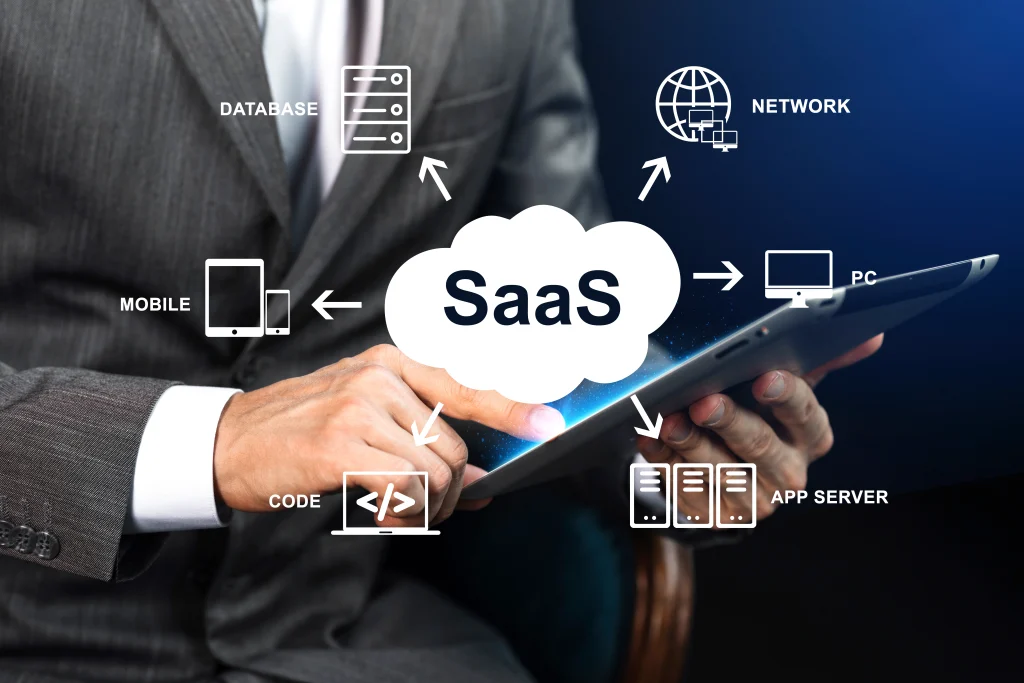
Before diving into the material differences, it’s essential to establish a clear understanding of what SaaS actually means. Software as a Service is a cloud-based software delivery model where a provider hosts fully functional applications on remote infrastructure and makes them accessible to subscribers over the internet, typically through a web browser.
The defining characteristic of SaaS is that the vendor bears responsibility for the entire software stack: hardware, operating system, middleware, application code, and data backup. Subscribers pay on a recurring basis, usually monthly or annually, for access rights rather than ownership. This fundamental shift from ownership to access represents one of the most significant differences when considering is there a material difference between SaaS and traditional software models.
Key SaaS Characteristics
SaaS applications operate on several core principles that distinguish them from other software delivery methods:
-
Multi-tenant architecture: A single instance of the application serves multiple customers, with logical isolation ensuring each tenant’s data and configurations remain private
-
Internet delivery: Accessible from any device with an internet connection, eliminating the need for local installations
-
Subscription-based pricing: Pay-as-you-go models replace large upfront capital expenditures
-
Automatic updates: Providers handle all maintenance, security patches, and feature updates
-
Minimal customer maintenance: Users don’t manage underlying infrastructure or software updates
The Evolution of Software Delivery
To truly understand whether is there a material difference between SaaS and other models, we must look at how software delivery has evolved over the decades. In the 1980s and 1990s, software was primarily delivered via physical media like floppy disks and CDs. Organizations purchased perpetual licenses and installed software on their own servers and workstations. This model required significant upfront investment, ongoing maintenance, and dedicated IT staff to manage updates and security.
The early 2000s saw the emergence of application service providers (ASPs), which hosted applications for customers but typically required custom integrations and offered limited scalability. SaaS evolved from this foundation, adding multi-tenancy, standardized pricing, and true web-based access.
Today, SaaS has become the dominant delivery model for business software, with major applications like customer relationship management, human resources, and collaboration tools available exclusively through cloud-based subscriptions. This shift represents more than just a technological change; it reflects fundamental differences in how businesses approach technology investment and management.
IaaS vs. PaaS vs. SaaS: Understanding the Cloud Service Spectrum
To fully answer is there a material difference between SaaS and other models, we must examine how it fits within the broader cloud computing ecosystem. The three primary cloud service models—Infrastructure as a Service (IaaS), Platform as a Service (PaaS), and Software as a Service (SaaS)—represent different levels of abstraction and user responsibility.
Infrastructure as a Service (IaaS)
IaaS provides the most foundational level of cloud services, offering virtualized computing resources over the internet. Think of it as renting computers in the cloud instead of buying physical servers. With IaaS, organizations get:
-
Virtual machines, storage, and networking resources
-
Complete control over operating systems and applications
-
Pay-as-you-go pricing for infrastructure resources
-
Flexibility to scale resources up or down based on demand
However, IaaS is the most hands-on model. IT teams remain responsible for managing operating systems, applications, middleware, and runtime environments. Compared to other cloud models, IaaS provides fewer preconfigured components, making it suitable for organizations with strong technical capabilities but potentially overwhelming for those without dedicated IT staff.
Common IaaS use cases include:
-
Hosting websites and web applications
-
Data backup and disaster recovery
-
Development and testing environments
-
High-performance computing workloads
-
Big data analytics
Platform as a Service (PaaS)
PaaS acts as the middle layer, bridging the gap between IaaS and SaaS. It combines infrastructure flexibility with streamlined workflows and rapid deployment benefits, making it ideal for developers building custom applications.
Key PaaS characteristics include:
-
Managed operating systems, middleware, and runtime environments
-
Built-in development tools and frameworks
-
Automated scaling and load balancing
-
Support for multiple programming languages
-
Reduced coding requirements for developers
PaaS enables development teams to focus on business logic rather than infrastructure management. Organizations can build, test, and deploy applications more quickly without worrying about server configuration, operating system patches, or capacity planning.
Common PaaS use cases include:
-
Custom application development
-
API development and management
-
Mobile app backend services
-
Internet of Things (IoT) application development
-
Database management and integration
Software as a Service (SaaS)
SaaS represents the most fully-formed cloud service, delivering complete, ready-to-use applications over the internet. When asking is there a material difference between SaaS and other models, the answer lies in the level of abstraction—SaaS users interact only with the application itself, never with the underlying infrastructure.
SaaS characteristics include:
-
Fully functional applications accessible via web browser
-
All infrastructure, maintenance, and updates handled by the provider
-
Multi-tenant architecture supporting multiple customers
-
Minimal user responsibility beyond configuration and data management
-
Predictable subscription-based pricing
Common SaaS use cases include:
-
Customer relationship management (CRM)
-
Enterprise resource planning (ERP)
-
Human resources management
-
Collaboration and communication tools
-
Accounting and financial management
Comparison Table: IaaS vs. PaaS vs. SaaS
| Aspect | IaaS | PaaS | SaaS |
|---|---|---|---|
| User Responsibility | Manage OS, middleware, apps, data | Manage applications and data only | Manage configuration and data only |
| Best For | IT infrastructure teams | Application developers | End users and business teams |
| Control Level | High control over infrastructure | Moderate control over applications | Low control (provider manages everything) |
| Technical Expertise Required | High | Moderate | Low |
| Setup Time | Hours to days | Minutes to hours | Immediate |
| Pricing Model | Pay for infrastructure usage | Pay for platform resources | Subscription per user or seat |
| Maintenance Responsibility | Customer manages most components | Provider manages platform, customer manages apps | Provider manages everything |
| Scalability Approach | Manual scaling of infrastructure | Automated platform scaling | Provider handles all scaling |
The Material Differences: SaaS vs. Traditional On-Premise Software
When exploring is there a material difference between SaaS and traditional software, the distinctions are significant and multifaceted. Let’s examine these differences systematically across multiple dimensions.
Cost Structure and Financial Implications
The financial model represents one of the most noticeable differences between SaaS and traditional software. Understanding this aspect is crucial when evaluating is there a material difference between SaaS and on-premise alternatives.
SaaS Financial Model:
-
Operational expenditure (OpEx): Monthly or annual subscription fees are predictable operating expenses that can be budgeted with confidence
-
No upfront capital investment: No need to purchase hardware, servers, or perpetual licenses, eliminating the need for large initial outlays
-
Scalable costs: Pay only for what you use, with the ability to adjust subscriptions as needs change
-
Lower barrier to entry: Free trials and low monthly fees reduce financial risk and allow organizations to test solutions before committing
-
Predictable cash flow: Fixed monthly costs simplify financial planning and reduce surprises
Traditional On-Premise Financial Model:
-
Capital expenditure (CapEx): Significant upfront investment in hardware and perpetual licenses that can strain budgets
-
Ongoing maintenance costs: Additional expenses for IT staff, upgrades, and infrastructure that accumulate over time
-
Higher switching costs: Major financial commitment makes changing providers or systems difficult and expensive
-
Budget unpredictability: Unexpected hardware failures and upgrade costs can disrupt financial planning and require unplanned expenditures
-
Hidden costs: Additional expenses for power, cooling, physical space, and insurance often go unaccounted for
When organizations evaluate is there a material difference between SaaS and traditional software, the financial implications often tip the scales toward SaaS. The predictability of subscription costs versus the uncertainty of hardware maintenance and replacement creates a compelling case for cloud-based solutions.
Total Cost of Ownership Comparison:
| Cost Category | SaaS | On-Premise |
|---|---|---|
| Software Licenses | Included in subscription | Large upfront payment |
| Hardware | Included in subscription | Significant capital expense |
| IT Staff | Minimal internal resources needed | Full-time dedicated team required |
| Upgrades | Included in subscription | Additional cost for each upgrade |
| Maintenance | Included in subscription | Regular maintenance contracts |
| Training | Often included | Additional training costs |
| Power and Cooling | Included in subscription | Direct operational expense |
| Physical Space | Included in subscription | Server room or data center space |
| Disaster Recovery | Included in subscription | Additional investment required |
Deployment and Maintenance Differences
The question is there a material difference between SaaS and on-premise software becomes particularly apparent when examining deployment and maintenance requirements. These operational differences affect everything from user productivity to IT workload.
SaaS Deployment:
-
Zero footprint: No software installation required on user devices beyond a web browser
-
Immediate access: Users can start working within minutes of subscribing and creating an account
-
Automatic updates: Providers handle all updates, security patches, and feature releases, often without users even noticing
-
Centralized management: Provider manages all infrastructure, security, and application performance
-
Global accessibility: Access from any location with internet connectivity and a compatible browser
-
Consistent experience: All users access the same version, eliminating compatibility issues
On-Premise Deployment:
-
Manual installation: Software must be installed on each device or server, a time-consuming process
-
Lengthy setup: Deployment can take weeks or months, depending on infrastructure readiness and complexity
-
Manual updates: IT teams must handle all patches, upgrades, and security measures, requiring significant effort
-
Decentralized management: Each organization manages its own infrastructure, leading to variable quality
-
Location-dependent access: Typically restricted to office networks or requires complex VPN configurations
-
Version fragmentation: Different departments may run different versions, creating support challenges
Organizations considering is there a material difference between SaaS often highlight the deployment speed as a key advantage. Traditional on-premise deployments require careful planning, hardware procurement, and extensive testing before users can access the system. SaaS eliminates these delays, enabling immediate value realization.
Maintenance Responsibilities Breakdown:
| Activity | SaaS Responsibility | On-Premise Responsibility |
|---|---|---|
| Hardware Maintenance | Provider | Customer |
| Operating System Updates | Provider | Customer |
| Security Patching | Provider | Customer |
| Application Updates | Provider | Customer |
| Database Management | Provider (usually) | Customer |
| Backup and Recovery | Provider | Customer |
| User Management | Customer | Customer |
| Configuration | Customer | Customer |
| Integration Management | Customer | Customer |
| Performance Monitoring | Provider | Customer |
Scalability and Flexibility
When considering is there a material difference between SaaS in terms of scalability, the answer is a resounding yes. The ability to scale resources on demand represents one of the most significant advantages of modern cloud-based solutions.
SaaS Scalability:
-
On-demand scaling: Users can scale up or down as needed by simply upgrading or downgrading their subscription tiers
-
Global expansion: Adding users or expanding to new regions requires no infrastructure investment or planning
-
Built-in elasticity: Resources automatically adjust to handle traffic spikes and seasonal demands
-
Instant provisioning: New users can be added immediately without waiting for hardware or software installation
-
Resource optimization: Pay only for the resources you actually use, eliminating waste
On-Premise Scalability:
-
Infrastructure-limited: Scaling requires purchasing and installing new hardware, which can take weeks or months
-
Geographic constraints: Expanding to new locations requires additional infrastructure investment and logistics
-
Manual scaling: IT teams must anticipate demand and provision resources proactively, often leading to over-provisioning
-
Delayed provisioning: Adding new users requires software installation, license allocation, and configuration
-
Capacity planning challenges: Balancing over-provisioning (wasted resources) against under-provisioning (poor performance)
When organizations ask is there a material difference between SaaS and traditional software for growing businesses, the scalability advantages become decisive. Startups and rapidly growing companies particularly benefit from the ability to scale without capital investment.
Scalability Comparison:
| Aspect | SaaS | On-Premise |
|---|---|---|
| Time to Add 100 Users | Minutes | Days to weeks |
| Global Expansion Cost | Minimal | Significant |
| Handling Traffic Spikes | Automatic | Manual and complex |
| Seasonal Scaling | Easy (upgrade/downgrade) | Complex (hardware changes) |
| Disaster Recovery | Provider handles | Customer must plan and execute |
| Geographic Reach | Built-in | Requires additional investment |
| Resource Optimization | Provider manages efficiently | Customer must manage carefully |
Customization and Control Tradeoffs
Perhaps the most significant consideration when evaluating is there a material difference between SaaS and other models relates to customization and control. This tradeoff requires careful consideration of organizational needs and capabilities.
SaaS Customization:
-
Configuration options: Most SaaS products offer extensive configuration rather than deep customization
-
Limited control: Users can’t modify the underlying code or infrastructure, ensuring stability and security
-
Standardized features: All users access the same version with the same core features, simplifying support
-
API integration: Integration with other systems is typically available through robust APIs
-
Configuration flexibility: Users can customize workflows, fields, and reports within defined parameters
On-Premise Customization:
-
Full customization: Complete control over code, features, and functionality, enabling unique solutions
-
Complete control: Organizations own and control all aspects of the software and data
-
Tailored solutions: Systems can be built to exact specifications, supporting unique processes
-
Deep integration: Flexible integration with existing systems and workflows
-
Bespoke development: Custom features can be developed to meet specific business requirements
This tradeoff is particularly relevant in regulated industries and organizations with unique business processes. When evaluating is there a material difference between SaaS for their specific needs, organizations must consider whether configuration capabilities are sufficient or if true customization is required.
Customization Options Comparison:
| Feature | SaaS | On-Premise |
|---|---|---|
| Core Code Modification | Not available | Available |
| Workflow Customization | Configuration options | Full programming |
| Reporting and Dashboards | Built-in tools | Custom development possible |
| User Interface Changes | Limited to themes | Complete redesign possible |
| Integration Depth | API-based integration | Direct database access possible |
| Feature Development | Roadmap influence | Self-development |
| Configuration Management | User-friendly tools | Technical expertise required |
| Version Control | Provider manages | Customer manages |
Vendor Lock-in Considerations
When examining is there a material difference between SaaS in terms of switching costs and vendor lock-in, important considerations emerge that affect long-term strategic decisions.
SaaS Vendor Lock-in:
-
Lower financial barriers: Monthly subscriptions mean lower immediate switching costs compared to perpetual licenses
-
Data portability: Moving data to competitors can be complex and time-consuming, requiring careful planning
-
Process dependency: Organizations may become dependent on specific workflows and feature sets
-
Integration lock-in: Custom integrations and third-party connections can make switching difficult
-
User familiarity: Training users on new systems creates additional switching friction
On-Premise Vendor Lock-in:
-
High financial barriers: Large upfront investment makes switching expensive and politically challenging
-
Technical lock-in: Proprietary code and deep customization create significant dependencies
-
Infrastructure dependency: Hardware investments create additional switching costs
-
Data migration complexity: Moving large volumes of data between on-premise systems is technically challenging
-
Custom development: Bespoke features may not translate to new systems
When considering is there a material difference between SaaS regarding vendor lock-in, organizations must weigh the lower financial barriers of SaaS against the data and process dependencies that develop over time. Mitigation strategies include:
-
Data export capabilities: Regularly exporting data to maintain portability
-
API-first architecture: Using APIs to maintain flexibility in integrations
-
Multi-vendor strategy: Avoiding single-vendor dependence where possible
-
Contractual protections: Negotiating data portability and exit clauses in contracts
-
Open standards: Preferring solutions that support open data formats
Is There a Material Difference Between SaaS in Terms of Security?
Security considerations often dominate discussions about software deployment models. When asking is there a material difference between SaaS regarding security, several important factors emerge that organizations must evaluate carefully.
Shared Responsibility Model
SaaS operates on a shared security responsibility model that clearly delineates responsibilities between provider and customer:
Provider Responsibilities:
-
Infrastructure security (physical and virtual)
-
Network security and protection
-
Data center physical security
-
Application security patches
-
Platform hardening
-
Compliance with security standards
Customer Responsibilities:
-
User access management and authentication
-
Data classification and handling
-
Secure configuration of the application
-
Employee security training
-
Integration security
-
Data backup (though typically handled by provider)
-
Incident response (in coordination with provider)
Understanding this division is essential when evaluating is there a material difference between SaaS and on-premise security. Organizations must ensure they have the capability to meet their security responsibilities.
SaaS Security Advantages
SaaS providers often offer superior security compared to what most organizations can achieve internally:
-
Dedicated security teams: Providers maintain specialized security personnel with deep expertise
-
Economies of scale: Investment in advanced security technologies can be distributed across many customers
-
Automated patching: Security updates applied without customer intervention, reducing vulnerability windows
-
Compliance certifications: Many providers achieve industry-standard certifications (SOC 2, ISO 27001, HIPAA, etc.)
-
Advanced monitoring: Continuous security monitoring with sophisticated threat detection
-
Penetration testing: Regular security testing by internal and external experts
-
Incident response expertise: Established processes and teams for security incident handling
SaaS Security Concerns
Despite these advantages, SaaS introduces unique security considerations:
-
Third-party data storage: Sensitive information stored outside organizational control, creating trust requirements
-
Multi-tenant environment: Theoretical risks from other tenants (though providers implement strong isolation)
-
Data sovereignty: Data stored in locations that may not meet regulatory requirements
-
Integration risks: API connections can introduce vulnerabilities if not properly secured
-
Access control complexity: Managing user access across multiple SaaS applications becomes challenging
-
Compliance verification: Organizations must rely on provider certifications and audits
Organizations handling sensitive data should carefully evaluate whether is there a material difference between SaaS security and what they could achieve internally. For highly regulated industries or government organizations, the security considerations may influence deployment decisions.
Comparing Security Postures
| Security Aspect | SaaS | On-Premise |
|---|---|---|
| Security Expertise | Provider has specialized teams | Customer must build or hire expertise |
| Security Investment | Shared across many customers | Customer bears full cost |
| Patching Speed | Immediate | Variable based on IT resources |
| Compliance Certifications | Often industry-standard | Customer must obtain |
| Physical Security | Provider ensures data center security | Customer manages facility security |
| Security Monitoring | Continuous, professional | Variable based on resources |
| Incident Response | Established processes | Customer must develop |
| Data Control | Shared with provider | Complete customer control |
| Audit Access | Typically available | Full internal access |
The SaaS Subscription Lifecycle
Understanding the subscription lifecycle helps clarify is there a material difference between SaaS in terms of how software is delivered and maintained over time. This lifecycle represents a fundamental operational distinction from traditional software models.
Key Lifecycle Stages
1. Sign-up and Activation:
The customer selects a subscription plan, provides payment information, and configures their account. This stage includes:
-
Plan selection based on organizational needs
-
Payment method establishment
-
Initial configuration and setup
-
User account creation
-
Tenant provisioning
2. Provisioning:
The provider allocates resources, creates tenant accounts, and configures the service. This typically includes:
-
Infrastructure resource allocation
-
Database setup and configuration
-
Security settings implementation
-
User permission configuration
-
Integration setup if applicable
3. Active Usage:
The customer uses the service with ongoing billing. This is the steady state of a SaaS subscription:
-
Regular application usage by users
-
Monthly recurring billing
-
Usage monitoring
-
Ongoing support and maintenance
-
Feature adoption and configuration refinement
4. Updates and Modifications:
Customers can change plans, add or remove users, or modify configurations:
-
Subscription upgrades or downgrades
-
User addition or removal
-
Feature activation or deactivation
-
Configuration changes
-
Integration additions or removals
5. Cancellation and Offboarding:
Following established procedures for subscription termination:
-
Notification to provider
-
Final billing processing
-
Resource deprovisioning
-
Data export period
-
Account closure
-
Confirmation of termination
Subscription Management Considerations
Understanding is there a material difference between SaaS and traditional software requires recognizing the ongoing nature of the subscription relationship:
-
Continuous payment relationship: Unlike perpetual licenses, SaaS requires ongoing financial engagement
-
Feature evolution: Customers benefit from continuous improvement without additional cost
-
Flexibility: Subscriptions can be adjusted as organizational needs change
-
Portfolio management: Multiple SaaS subscriptions require ongoing management
The Cancellation Process Explained
Understanding the cancellation process when asking is there a material difference between SaaS helps clarify the subscription nature of these services and provides practical guidance for organizations.
Standard SaaS Cancellation Process:
Step 1: Request Initiation
The customer formally requests cancellation through the provider’s portal, by contacting support, or through their account management interface. This request typically includes:
-
Identification of the specific subscription to be cancelled
-
Desired effective date (immediate or end of current billing cycle)
-
Reason for cancellation (often requested but not required)
-
Confirmation of understanding regarding data retention
Step 2: Eligibility Verification
The provider checks the subscription terms to ensure cancellation is permissible:
-
Minimum commitment period verification
-
Outstanding balance check
-
Contractual obligations review
-
Confirmation of payment status
Step 3: Effective Date Determination
The provider establishes when the cancellation takes effect:
-
Immediate cancellation (service stops immediately, prorated refund)
-
End of billing period cancellation (service continues until current period ends)
-
Future date cancellation (service continues until specified date)
-
Enterprise contract terms may specify notice periods
Step 4: Final Billing Processing
Any outstanding charges are calculated and processed:
-
Prorated credits or charges for partial billing periods
-
Final invoice generation
-
Processing of any outstanding payments
-
Refund processing if applicable
-
Credit card or billing account updates
Step 5: Resource Deprovisioning
Provider allocates resources according to data retention policies:
-
Tenant resource deallocation
-
Database cleanup according to retention policy
-
Application removal from infrastructure
-
Security clearance processing
Step 6: Data Export Window
The customer is typically offered a window to export data before permanent deletion:
-
Export tools may be provided
-
Standard export formats (CSV, XML, JSON)
-
Time-limited access for data retrieval
-
API-based export options
Step 7: Confirmation
Final confirmation of successful cancellation:
-
Email confirmation to administrators
-
Account access termination notice
-
Final invoice and payment confirmation
-
Archival of business records
Step 8: Account Closure
Complete closure of the customer account:
-
User access removal
-
Authentication methods disabled
-
Billing deactivated
-
Account archived
Practical Considerations for Cancellation:
When planning cancellation, organizations should consider:
-
Data ownership and export: Ensure you can retrieve all necessary data before cancellation
-
Integration impact: Understand how cancellation affects connected systems
-
User communication: Plan for communicating changes to affected users
-
Alternative solutions: Have new solution ready before cancellation
-
Timing: Coordinate cancellation with billing cycles to optimize costs
-
Archival needs: Maintain access to historical data if needed
Is There a Material Difference Between SaaS for Different Business Sizes?
The question is there a material difference between SaaS becomes more nuanced when considering the specific needs and capabilities of different business sizes and organizational contexts.
For Small and Medium Businesses (SMBs)
SMBs typically benefit most from SaaS due to several key factors:
Advantages for SMBs:
-
Lower entry costs: No capital investment required, preserving cash flow
-
Reduced IT requirements: No need for in-house technical expertise or infrastructure
-
Professional-grade tools: Access to sophisticated software previously unavailable to smaller organizations
-
Predictable expenses: Fixed monthly costs simplify budgeting and financial planning
-
Competitive capabilities: Access to tools that level the playing field with larger competitors
-
Automatic updates: Always using the latest features without IT overhead
-
Scalability: Easy to add users or features as the business grows
Considerations for SMBs:
-
Provider dependency: Reliance on provider for availability and data security
-
Data location: May not be able to control where data resides
-
Customization limits: May not support all unique business processes
-
Cost growth: Subscription costs can increase as the business expands
For small businesses with limited IT resources, asking is there a material difference between SaaS often reveals that SaaS offers capabilities they couldn’t otherwise afford. The operational efficiency gains typically outweigh the concerns about control and customization.
For Enterprises
Larger organizations face more complex considerations when evaluating is there a material difference between SaaS:
Advantages for Enterprises:
-
Standardization: Consistent tools across global operations
-
Global scaling: Easy expansion to new markets and regions
-
Modern capabilities: Access to AI, analytics, and other advanced features
-
Vendor expertise: Leverage provider’s specialized knowledge and resources
-
Cost predictability: Convert variable IT costs to predictable subscriptions
Considerations for Enterprises:
-
Integration requirements: Need to connect SaaS with existing enterprise systems
-
Compliance demands: Regulatory requirements may restrict SaaS adoption
-
Customization needs: Unique processes may require extensive configuration
-
Data governance: Data privacy and sovereignty concerns
-
Identity management: Complex user management across multiple systems
-
Vendor management: Multiple SaaS vendors create management complexity
Enterprises often require a more nuanced evaluation when asking is there a material difference between SaaS for their specific context. For some enterprise applications, the control of on-premise deployment may outweigh the benefits of SaaS.
Enterprise SaaS Adoption Challenges:
| Challenge | Description | Potential Solution |
|---|---|---|
| Integration Complexity | Connecting SaaS to existing systems | API management platforms |
| Identity Management | User access across applications | Single Sign-On implementation |
| Data Compliance | Meeting regulatory requirements | Careful vendor selection |
| Change Management | User adoption and transition | Comprehensive training programs |
| Vendor Consolidation | Managing multiple providers | Strategic vendor selection |
| Customization Needs | Unique business processes | Configuration optimization |
| Data Security | Enterprise-grade protection | Security assessment and monitoring |
Hybrid Approaches
Many organizations adopt hybrid approaches, using SaaS for some applications while maintaining on-premise solutions for others. This approach allows organizations to:
-
Strategic deployment: Use SaaS where speed and cost efficiency are priorities
-
Control retention: Maintain on-premise solutions where control is essential
-
Risk management: Balance cloud and on-premise risk profiles
-
Gradual migration: Move applications to SaaS as confidence and capabilities grow
-
Compliance management: Address regulatory requirements appropriately
-
Legacy integration: Bridge between modern and legacy systems
When organizations ask is there a material difference between SaaS and other models, the answer increasingly points toward hybrid strategies that leverage the strengths of multiple approaches.
The Future of SaaS: What’s Next?
As technology continues to evolve, the answer to is there a material difference between SaaS may shift. Several trends are shaping the future of software delivery and may further differentiate SaaS from traditional models.
AI-Powered SaaS
Artificial intelligence is increasingly integrated into SaaS applications, offering:
-
Predictive analytics: Automatically identifying patterns and suggesting actions
-
Automated insights: Surfacing relevant information without user queries
-
Personalized experiences: Tailoring interfaces and features to individual users
-
Enhanced security: AI-driven threat detection and response
-
Intelligent automation: Streamlining workflows through AI-powered suggestions
The integration of AI represents an evolution of the core value proposition of SaaS. When considering is there a material difference between SaaS and traditional software, AI capabilities that continuously improve without user intervention represent a significant differentiator.
Embedded SaaS
Software functionality is increasingly embedded into other applications and platforms:
-
Payment processing integrated into e-commerce platforms
-
CRM functionality embedded in marketing tools
-
Analytics capabilities built into various business applications
-
Communication features integrated across platforms
-
Specialized functionality embedded in industry-specific applications
This trend further emphasizes the service aspect of SaaS, moving away from standalone applications toward integrated capabilities.
Usage-Based Billing Evolution
Many modern SaaS products use hybrid models incorporating usage-based charges:
-
Base subscription fee plus usage-based charges for API calls, seats, or data volume
-
More granular pricing aligned with actual value delivered
-
Flexibility to grow with customer needs
-
Better alignment of cost with value received
Vertical SaaS
Increasing specialization in SaaS solutions focused on specific industries:
-
Healthcare-specific SaaS with regulatory compliance built in
-
Construction management solutions with industry-specific workflows
-
Legal practice management with document handling and billing
-
Manufacturing solutions with production tracking and quality management
Low-Code and No-Code SaaS
Empowering business users to customize and extend SaaS applications:
-
Drag-and-drop workflow creation
-
Custom application building without coding
-
Integration creation through visual interfaces
-
Rapid prototyping and iteration
Sovereign Cloud Offerings
Growing demand for region-specific cloud deployments:
-
Data residency compliance built in
-
Local language and regulatory support
-
Performance optimization for specific regions
-
Government and regulated industry solutions
Practical Decision-Making Framework
When deciding whether SaaS or traditional software is right for your organization, consider the following framework. This structured approach helps answer is there a material difference between SaaS and which model best serves your needs.
When to Choose SaaS
SaaS is typically the right choice when:
-
Limited IT resources: You lack in-house technical expertise for software management
-
Budget constraints: Capital expenditure is limited, but operational budget is available
-
Rapid scaling: You expect to grow or shrink quickly and need flexibility
-
Remote workforce: Employees need access from various locations and devices
-
Non-core applications: The software isn’t central to your competitive advantage
-
Short-term needs: Project-based or temporary software requirements
-
Predictable pricing: You value cost predictability over potential savings
When to Choose On-Premise
On-premise software may be preferable when:
-
Data sovereignty: Regulatory requirements mandate on-premise data storage
-
Deep customization: Your processes require extensive modifications to standard software
-
Predictable load: Your usage is stable and predictable over long periods
-
High-performance requirements: Applications with specific performance needs
-
Security concerns: The highest levels of data protection required
-
Long-term investment: Software that will be used for decades with minimal change
-
Integration requirements: Extensive integration with legacy on-premise systems
When to Choose Hybrid
A hybrid approach works well when:
-
Transition strategy: Moving gradually from on-premise to cloud
-
Balanced approach: Different applications have different requirements
-
Data sensitivity: Mixed data handling needs across the organization
-
Regulatory complexity: Varying compliance requirements for different functions
-
User diversity: Different user groups have different needs and preferences
Conclusion: Is There a Material Difference Between SaaS? A Final Assessment
After examining the evidence across multiple dimensions, the answer to is there a material difference between SaaS and other software models is a definitive yes. The differences are substantial, multifaceted, and deeply impactful on how organizations acquire, use, and pay for software.
Summary of Key Material Differences
| Dimension | SaaS | Traditional Software |
|---|---|---|
| Cost Model | Operational expense, pay-as-you-go | Capital expense, large upfront |
| Maintenance | Provider managed | Customer managed |
| Updates | Automatic, continuous | Manual, periodic |
| Scalability | On-demand, automated | Planned, manual |
| Customization | Configuration based | Development based |
| Accessibility | Anywhere, any device | Location dependent |
| Security Responsibility | Shared model | Customer managed |
| Switching Costs | Lower financial, higher process | Higher financial, lower process |
| Time to Value | Immediate | Extended |
| IT Requirements | Minimal | Significant |
Key Takeaways
-
Cost structure is fundamentally different: SaaS transforms capital expenditure into operational expenditure, with significant implications for cash flow and financial planning
-
Maintenance burden shifts completely: Organizations can redirect IT resources from maintenance to innovation
-
Scalability becomes effortless: SaaS enables rapid growth without infrastructure constraints
-
Control tradeoffs are real: SaaS sacrifices some control for convenience and speed
-
The subscription relationship is continuous: Unlike perpetual licenses, SaaS requires ongoing engagement and management
-
Security is a shared responsibility: Organizations must understand and fulfill their security obligations
-
Hybrid approaches are increasingly common: Most organizations benefit from a mix of deployment models
Actionable Takeaways
-
Evaluate your specific needs: Consider your IT resources, budget, and regulatory requirements
-
Assess your data sensitivity: Determine whether data sovereignty concerns require on-premise solutions
-
Consider your growth trajectory: SaaS is ideal for rapidly growing or fluctuating needs
-
Start with non-core applications: Begin your cloud journey with less critical functions
-
Develop exit strategies: Always plan for data portability regardless of deployment model
-
Monitor usage and costs: SaaS subscriptions require active management to optimize value
-
Plan for the long term: Consider how your software strategy will evolve over 5-10 years
Making Smart Software Decisions
Understanding is there a material difference between SaaS and traditional software is essential for making informed technology decisions. The right choice depends on your organization’s specific needs, capabilities, and strategic objectives.
For many organizations, SaaS provides compelling advantages in cost, agility, and access to innovation. For others, particularly in regulated industries or with unique requirements, on-premise solutions may remain necessary. Hybrid approaches often provide the best balance, allowing organizations to leverage the advantages of both models.
The key is to make conscious, informed decisions based on a thorough understanding of the material differences between these software delivery models. By doing so, you can optimize your software investments for maximum value, minimize risk, and support your organization’s strategic objectives.
Final Recommendations
-
Conduct a thorough assessment: Evaluate your specific needs, capabilities, and constraints before choosing a deployment model
-
Start small with SaaS: Begin with low-risk applications to build experience and confidence
-
Maintain flexibility: Design systems to avoid vendor lock-in and maintain options
-
Stay informed: Technology evolves rapidly; regularly reassess your software strategy
-
Balance needs and capabilities: Choose solutions that match both your business needs and technical capabilities
By applying these principles, you can make confident decisions that leverage the best aspects of each software delivery model. Whether you ultimately choose SaaS, on-premise, or a hybrid approach, understanding is there a material difference between SaaS and other models will enable better strategic decisions and more effective technology investments.